
 By admin
 Ever noticed how much your location controls what you see online? On social apps, it decides who you match with or where your content shows up. On streaming platforms, it literally determines which movies, shows, or videos you’re allowed to watch.
That’s why more people are starting to look for how to change location on iPhone and Android, not for anything complicated, just to get a bit more control over how apps work. In this guide, we’ll break down how location works on social and streaming apps, what your options are, and how people are actually changing their GPS location in 2026.
Why Location Matters More Than You Think
Most popular apps rely heavily on your GPS data.
- Social apps: Apps like Tinder, Snapchat, and WhatsApp use your location to suggest nearby matches, show local content, tag your posts or stories, or share your live location with others.
- Streaming platforms: Platforms like Netflix or YouTube use your location to limit content based on region, recommend videos based on your country, or control what’s trending in your area
So if you’ve ever wondered why your friend in another country sees completely different content, it’s all about location.
Common Reasons People Change Their Location
This isn’t just a “tech trick”, there are actually pretty practical reasons people do it.
- Access more content: Streaming libraries vary by region. Changing your location can unlock shows or videos not available where you are.
- Expand social reach: On apps like Tinder, switching your location lets you match with people in different cities or countries.
- Protect privacy: Not everyone is comfortable sharing their real location all the time. Adjusting it gives you more control.
- Send a different location: Sometimes you just want to share a different place on WhatsApp or similar apps without revealing where you actually are.
Can You Change Location Directly on iPhone or Android?
Not really, at least not in a meaningful way. On iPhone, Apple doesn’t allow apps or users to freely override GPS location. You can turn location services off, but that’s not the same as setting a new location. On Android, there are developer options for mock locations, but they’re not very stable for everyday use and often don’t work well with popular apps.
What about VPNs?
VPNs only change your IP address, not your GPS location. That means streaming apps might partially change content, and social apps usually won’t be affected. So if you want apps to fully recognize a new location, you need something that actually changes your GPS data.
The Practical Solution: GPS Location Changer Tools
This is where most users land. Instead of trying to tweak settings on your phone, GPS location tools connect your device to a computer and simulate a new location externally.
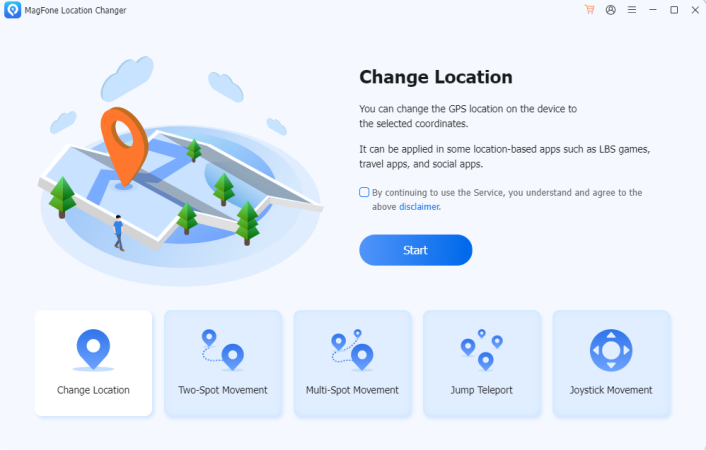
One example is MagFone Location Changer, which is designed to make this process simple without requiring jailbreak or root. The idea is straightforward:
- You pick a location on a map
- Your phone updates its GPS coordinates
- Apps start treating you as if you’re there
How to Change Location on Social Apps (Step-by-Step)
Here’s how people typically use a tool like this in real life.
Step 1: Install the software on your computer and connect your iPhone or Android device. Click Start button, and choose General mode.
Step 2: Search for any city or drop a pin on the map. Click Start Modify button to apply the new location so your phone updates instantly.
Step 3: Open your social app, apps like Tinder or Snapchat will now use the new location.
Example: Changing Location on Tinder
Instead of being limited to your current city, you can:
- Match with people anywhere
- Explore different regions
- Test how your profile performs in other locations
Example: Sending a Fake Location on WhatsApp
Once your GPS is changed, open WhatsApp, share location. The app will send your modified location. No extra steps needed.
How to Change Location for Streaming Apps
Streaming apps are a bit different, but the concept is similar.
What works:
- Changing GPS location
- Combining it with a VPN (for full effect)
What doesn’t:
- Using GPS tools alone (for some platforms)
- Using VPN alone (for precise location apps)
In many cases, users combine both methods for better results.
Features That Actually Make a Difference
Not all location tools are the same. Some features are especially useful:
- Joystick movement: Lets you move in real time instead of jumping between locations.
- Route simulation: Simulates walking along a path—useful for apps that track movement.
- Adjustable speed: Helps you move naturally instead of triggering detection systems.
These features make the experience feel more realistic and less likely to cause issues with apps.
Is It Safe to Change Your Location?
Generally, yes, but there are a few things to keep in mind.
- Don’t jump between countries too frequently
- Avoid unrealistic movement speeds
- Use consistent locations when possible
For social and streaming apps, the risk is usually low. Still, keeping your activity natural is always a good idea.
Final Thoughts
Changing your location on social and streaming apps isn’t about “tricking the system”, it’s about having more control over how apps interact with you. Whether you want to explore new matches, access different content, or simply protect your privacy, adjusting your GPS location can open up a lot of possibilities.
Tools like MagFone Location Changer make that process accessible, even if you’re not particularly tech-savvy. And once you understand how it works, it’s surprisingly simple to use. At the end of the day, it’s just another way to make your phone work the way you want it to, not the other way around.